umqtt.default
umqtt.default rewrites the subscribe() method and supports ca file.
Micropython Example:
import umqtt
c = umqtt.MQTTClient(
    "umqtt_client",
    "emqxsl.cn",
    port=8883, user='test', password='test', keepalive=60,
    ssl=True,
    ssl_params={"cert": "/flash/ca.crt", "server_hostname": "emqxsl.cn"}
)

def on_sub_cb(data):
    print("topic:", data[0])
    print("msg:", data[1])

if not c.connect(clean_session=True):
    print("New session being set up")
    c.subscribe(b"testtopic", on_sub_cb)

while True:
    c.wait_msg()
UIFLOW2 Example:
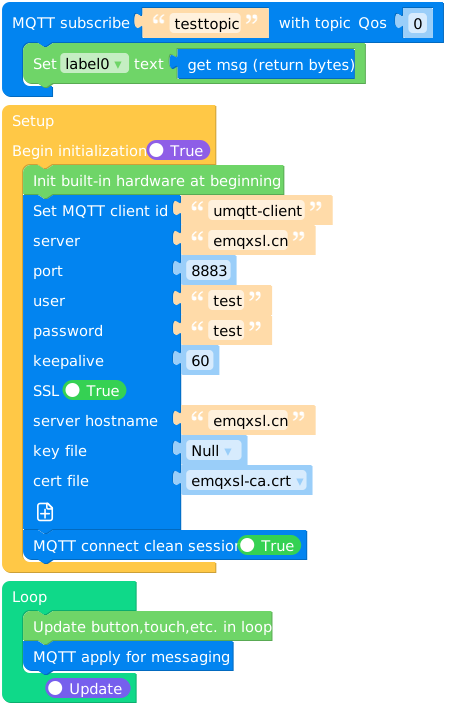
Constructors
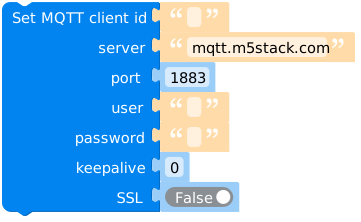
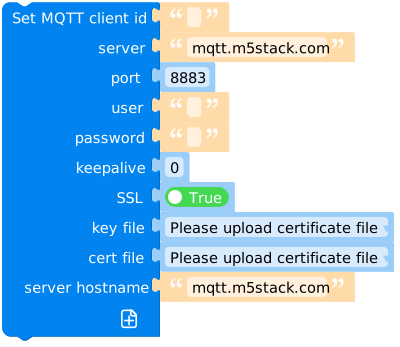
- class umqtt.MQTTClient(client_id, server, port=0, user=None, password=None, keepalive=0, ssl=False, ssl_params={}) None
Create an MQTTClient object.
- Parameters:
client_id (str) – the unique client id string used when connecting to the broker.
server (str) – the hostname or IP address of the remote broker.
port (int) – the network port of the server host to connect to.
user (str or None) – a username for broker authentication.
password (str or None) – a password for broker authentication.
keepalive (int) – maximum period in seconds allowed between communications with the broker. If no other messages are being exchanged, this controls the rate at which the client will send ping messages to the broker.
ssl (bool) – Whether to use ssl.
ssl_params (dict) – Some parameters required to initiate an ssl connection.
- Returns:
MQTTClient object
- Return type:
UIFLOW2:
Methods
- MQTTClient.connect(clean_session=True) bool
Connect to a server. Returns True if this connection uses persisten session stored on a server (this will be always False if clean_session=True argument is used (default)).
UIFLOW2:

- MQTTClient.disconnect() None
Disconnect from a server, release resources.
UIFLOW2:

- MQTTClient.reconnect() None
Disconnect from a server, release resources.
UIFLOW2:

- MQTTClient.ping() None
Ping server (response is processed automatically by
wait_msg()).UIFLOW2:
None
- MQTTClient.publish(topic, msg, retain=False, qos=0) None
Publish a message.
- Parameters:
topic (str or bytes or bytearray) – the topic that the message should be published on.
msg (str or bytes or bytearray) – the message to send as a will.
retain (bool) – if set to True, the will message will be set as the “last will”/retained message for the topic.
qos (int) – the quality of service level to use
UIFLOW2:

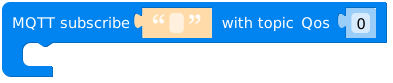
- MQTTClient.subscribe(topic, handler, qos=0) None
Subscribe to a topic.
- Parameters:
topic (str or bytes or bytearray) – a string specifying the subscription topic to subscribe to.
handler (function) – called when a message has been received on a topic that the client subscribes to and the message does match an existing topic filter callback.
qos (int) – the desired quality of service level for the subscription. Defaults to 0.
UIFLOW2:
An handler showing a message has been received:
def on_sub_cb(data):
    print("topic:", data[0])
    print("msg:", data[1])
On uiflow2, you can get the topic and message of the current handler through
 and
and  .
.
- MQTTClient.set_last_will(topic, msg, retain=False, qos=0) None
Important
Should be called before
connect().Set MQTT “last will” message.
- Parameters:
topic (str or bytes or bytearray) – the topic that the will message should be published on.
msg (str or bytes or bytearray) – the message to send as a will. If not given, or set to None a zero length message will be used as the will.
retain (bool) – if set to True, the will message will be set as the “last will”/retained message for the topic.
qos (int) – the quality of service level to use for the will.
UIFLOW2:
- MQTTClient.wait_msg() None
Important
wait_msg()andcheck_msg()are “main loop iteration” methods, blocking and non-blocking version. They should be called periodically in a loop,wait_msg()if you don’t have any other foreground tasks to perform (i.e. your app just reacts to subscribed MQTT messages),check_msg()if you process other foreground tasks too.Note that you don’t need to call
wait_msg()/check_msg()if you only publish messages, never subscribe to them.Wait for a server message.
UIFLOW2:

- MQTTClient.check_msg(attempts=2) None
Check if there’s pending message from server. If yes, process the same way as
wait_msg(), if not, return immediately.UIFLOW2:
None